
CyberGate App for Microsoft Teams
Run CyberGate from inside Microsoft Teams
Answer the door, manage your devices, and control your availability — all without leaving the Teams client your team already lives in.
One app, every CyberGate moment
Your team's intercom, cameras, and paging
right inside Teams
The CyberGate App for Microsoft Teams brings every CyberGate workflow into the tool your colleagues already have open all day. No portal switching, no new password, no extra training. Install it from Microsoft AppSource or the Teams App Store, pin it to the sidebar, and CyberGate becomes a native part of Teams.
Available with an active CyberGate SaaS subscription. Hosted in Azure, secured with the Microsoft credentials your team already uses, and rolled out to your whole tenant in minutes.
What's in the app
Four ways the CyberGate app
makes your day easier
Every CyberGate action your team needs day-to-day — without opening another browser tab.
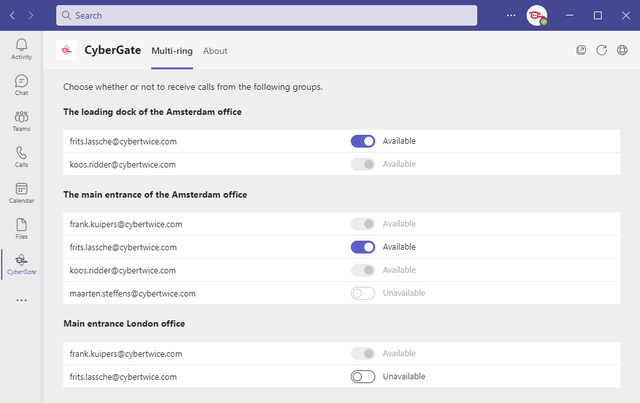
Set your own availability
Toggle yourself in or out of each Multi-Ring group with a single switch — for the days you're in back-to-back meetings, out of office, or working from home. No more pinging your manager to update the portal.
See every device at a glance
A live overview of all your CyberGate devices — intercoms, IP cameras, paging systems — with online status and a one-click call button next to each one. Search and filter by location to find the right device fast.
Open the door with one click
During an intercom call, the door-unlock button sits right in the sidebar — no more digging up DTMF codes on the dial pad. Visitors get in, you get back to work.
Supervisor controls for team leads
Appointed Supervisors get a full overview of who's available across every Multi-Ring group, and can adjust or overrule statuses on the spot — so there's always someone to answer the door, without handing out admin rights.
Built for the way your team really works
People are out of office, in all-day workshops, or working from home — and that shouldn't mean the front door goes unanswered. With the CyberGate app for Teams, each team member flips their own availability per device with a single toggle. Incoming intercom calls ring everyone who's still in, and the first to answer takes the call.
Supervisor — the manager's shortcut
Assign one or more Supervisors to each Multi-Ring group in the CyberGate Management Portal. Supervisors see the live status of their team and can adjust or overrule individual availability — even if they aren't part of the group themselves. Each Multi-Ring group supports up to 15 colleagues and is connected to a single device.
The result: managers stop being part-time availability administrators, end-users get control over their own day, and your visitors are never left ringing an empty doorbell.
Getting started
Up and running in
four steps
If you already have a CyberGate SaaS subscription, you're minutes away.
Step 1: Search "CyberGate"
Open the Microsoft Teams Apps panel or Microsoft AppSource and search for "CyberGate".
Step 2: Add CyberGate
Click "Add" to install the app for your account.
Step 3: Set your availability and explore your devices
Open the Multi-Ring tab to flip your availability per group. Browse the Devices tab to see what's online and start calls in one click.
Step 4: Pin CyberGate to the sidebar
Right-click the CyberGate icon and select "Pin" so it stays one click away — every day.
Bring CyberGate into Teams today
Install the CyberGate app from Microsoft AppSource or the Teams App Store — it's included with every active CyberGate SaaS subscription.
