
Capabilities of ATTEST
Everything ATTEST captures from your CyberGate devices
A single Azure-based SaaS solution to record, replay and attest every interaction that runs through CyberGate, in one clear overview.
The Strategic Value of ATTEST
Your doors, cameras and paging systems generate interactions all day long. Someone rings the intercom, a camera picks up an event, an announcement goes out. Normally none of that leaves a verifiable record, so the moment you need to prove what happened, and when, and to whom, there is nothing to go back to.
ATTEST closes that gap. It captures every audio and video stream that runs through CyberGate and turns it into a searchable, tamper-evident record you fully govern. One centralized platform, complete control over who can access what, and evidence you can stand behind for compliance, attestation and audits. Your physical infrastructure stops being a blind spot.
Read on to see what ATTEST captures, how it secures your recordings, and how you find exactly what you need in seconds.
What ATTEST can Record
Capture every interaction
that runs through CyberGate
Audio & Video
Depending on the device, ATTEST records the audio and video of a SIP video intercom call, a two-way video intercom, your connected IP cameras, or the audio of your IP paging system.
Connected IP Devices
ATTEST records a wide range of connected IP devices, including intercoms, speakers, paging adapters, visual alerters, cameras, microphones, amplifiers, bridges, gateways and audio decoders.
The free recording in CyberGate, and what ATTEST adds
Every CyberGate subscription includes basic recording, so you can capture your connected devices out of the box. ATTEST is the step up: more storage, longer retention, far more devices, and the compliance layer that turns a recording into verifiable evidence.
| Products | CyberGate built-in recording | ATTEST |
|---|---|---|
| Capabilities | ||
| Record connected IP devices (intercoms, cameras, paging) | ||
| Replay in Microsoft Teams | ||
| Storage capacity | Limited | Expanded |
| Retention time | Short / fixed | Fully configurable |
| Number of connected devices | Limited | Scales as you grow |
| Recordings encrypted with your own dedicated keys | ||
| Centrally stored in Azure Blob Storage | ||
| Central management portal | ||
| Role-based access control (RBAC) | ||
| Search and word spotting | ||
| Tamper-evident signing (attestation) | ||
| Full audit trail | ||
Security
How we secure
your recordings
Fully Encrypted recordings
very recording made with ATTEST is fully encrypted, so nobody can access it except you and the colleagues you assign.
Recordings in Azure Blob Storage
Your recordings are centrally stored in Azure Blob Storage, a familiar, highly secure and redundant environment (ZRS).
Dedicated Encryption keys
The encryption keys are your own, unique to your organization and fully under your control.
Authenticity
Every recording is signed to guarantee the authenticity and integrity of what is stored.
Using Microsoft Authentication
Authentication runs through Azure Active Directory with role-based access control. You use your existing Microsoft credentials to access the ATTEST Admin Portal and manage user rights in the ATTEST Replay app.
Recording retention time configurable
You set the retention time of your recordings exactly as your policy requires.
Audit trail
Attestation demands uncompromised data integrity and full transparency. ATTEST delivers complete accountability with tamper-evident traceability over every user interaction in the system.
No hard- and software necessary
You only need a CyberGate subscription and a Microsoft M365 Business, M365 Enterprise or O365 license to run ATTEST.
100% SaaS solution
ATTEST runs entirely as a Software as a Service solution in Microsoft Azure.
Recording features
Powerful
recording features
Transcription
Every recording can be transcribed automatically using Microsoft Cognitive Services.
Comprehensive Search
Any interaction can be retraced with a powerful search engine using recording data such as time, duration, direction and media type, plus participants, transcribed text and location.
MS-Teams integrated User-Interface
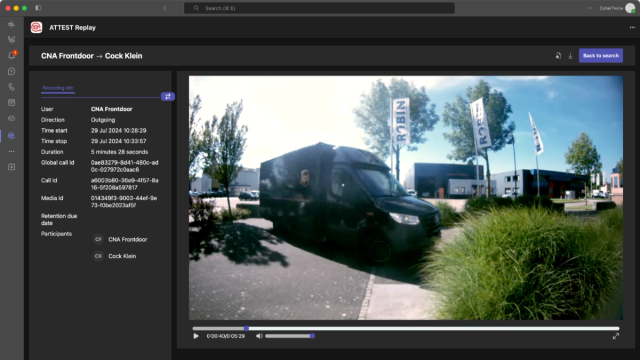
You access ATTEST through a Microsoft Teams app, fully integrated into your standard work environment.
Search & Replay
The Teams-integrated ATTEST Replay app gives you easy access to your recordings, audio only or with video.
User Management in Microsoft Azure Active directory
User management runs through Azure Active Directory, so you keep full RBAC control in a familiar place.
Search & replay
Find exactly what you need,
fast
ATTEST taps into Microsoft cognitive services so you can word-spot specific phrases across recordings, identify participants, and see who said what with graphical call marking.
Every recording is categorized and indexed for fast, easy search and replay. With location-based search you can even re-trace the movement behind an interaction using captured location data.
Want to record and replay your CyberGate devices directly in Teams?
Let's get started with ATTEST.
