
Recording, Replay & Attestation for your CyberGate connected devices
ATTEST captures your CyberGate communication and surveillance streams for instant replay and verification. Capture, analyze, and replay audio & video effortlessly. ATTEST is a unique, secure Azure SaaS solution that is the essential addition to your existing CyberGate subscription.


Attestation
Validating actions
In today's world, almost all activities are undertaken using digital media and take place in a distributed manner. At the same time, we have to follow guidelines for Business Processes, Administrative Processes, Compliance, and Security.
ATTEST is the best recorder solution for CyberGate. Like CyberGate it is a Microsoft Azure hosted SaaS and integrates seamlessly with CyberGate.
Record the audio and video of your intercoms and security cameras or record the audio of your paging system.
ATTEST
Secure
& Simple
No extra software programs
No additional hardware
No new login credentials
ATTEST Replay
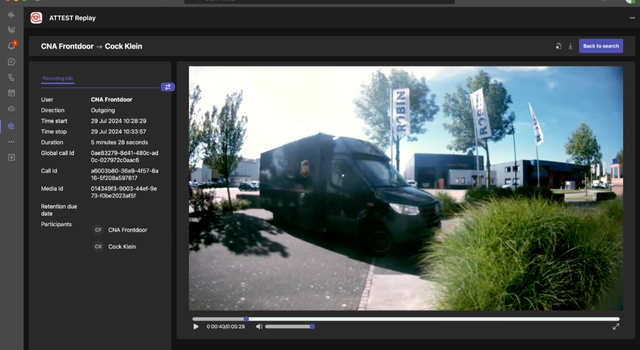
With the ATTEST Replay for Teams app, accessing and analyzing your recordings is effortless. The application allows you to search for specific keywords, automatically jumping to where they appear and highlighting them within the transcribed text. This is a powerful tool to pinpoint exactly what was said during a converstaion with a visitor. Combined with advanced filtering options, you can locate any recording in seconds.
Ready to use
Your communication
surveillance streams, captured and secure
Your communication and surveillance streams are captured, secure, and ready to use:
Record communication
Replay recordings
Attestation (provide evidence)
Monitor events
Search through your session
Save recordings encrypted
Transcribe speech-to-text
Recognize who was on the video of the intercom or camera
Control access to recordings
Sources
In ATTEST your recordings are
available from
Intercom
Activities from connected SIP video intercoms.
Camera
Footage from connected SIP-capable IP cameras.
Paging
Announcements broadcast through connected IP paging systems.
Looking for a way to record and replay your CyberGate connected devices?
ATTEST securely stores your recordings and allows you to use them for attestation, compliance, and analysis.
ATTEST
The perfect tool for your attestation and compliance!
The definition of attest: to provide or serve as clear evidence of…
The definition of attestation: an act of showing or evidence showing that something is true.
Your Data, Securely Protected
Every interaction within Microsoft Teams deserves the highest level of security. ATTEST is built entirely on Microsoft Azure, utilizing Azure Active Directory, Key Vault, and Blob Storage to encrypt and store your communication streams using your dedicated security keys. Your confidential data remains in a familiar, highly redundant, and secure environment.
Key Benefits:
- Total Access Control: Manage recording permissions and access rights natively through your existing Microsoft credentials and security policies (including MFA).
- Zero Infrastructure Hassle: No extra hardware or software to deploy means no maintenance overhead or hidden operational problems.
- Single Sign-On (SSO): No extra passwords or user roles to configure—ATTEST integrates completely with your current Microsoft estate.
For whom is ATTEST
ATTEST is designed for any organization that wants or needs to centrally capture the audio and video of their CyberGate connected devices, sucha as intercoms, cameras and paging systems. but need more storage, longer retention times and connect more devices than are available on the free recording build in CyberGate.
Our solution scales effortlessly across all sectors. It is just as effective for local businesses—such as car dealerships, construction firms, and insurance agencies—as it is for global enterprises and specialized environments, including Financial Services, Healthcare, Retail, Public Safety, Control Rooms, Emergency Services, and Government agencies. No matter your business size or operational focus, we offer a plan tailored to your needs.
Getting started
Getting started with
ATTEST
Follow these 5 main steps to get ATTEST up and running. For detailed steps, please follow our manual as referred to per step.
Step 1: Enable recording in CyberGate
In the CyberGate Management Portal, enable the default Recording feature.
Wait for the recording to be set-up, configure the devices to record.
Step 2: Subscribe
Find ATTEST by searching for "CyberTwice" in the Microsoft Azure Marketplace or AppSource. Select your plan and follow the prompts to subscribe.
Step 3: Sync and configure
Configure your environment using the ATTEST Management Portal.
Inside the portal, modify features to your need, such as automated transcriptions, custom data retention periods, and set user access permissions.
Step 4: Setup ATTEST Replay in Microsoft Teams
To review and replay your recordings, deploy the ATTEST Replay app within your Teams environment. Search for "CyberTwice" in the Microsoft Marketplace, select “ATTEST Replay”, install the app, and ensure all required user permissions are granted.
Step 5: Start capturing your communications
Now, you are ready to start recording and analyzing the captured data. Use the filters in ATTEST Replay to find what you are looking for easily. For questions about the configuration of ATTEST, please open a support ticket via our Support Portal.
Want to capture your CyberGate connected devices?
Get started with ATTEST right away! Safe & Simple
