CyberGate Call Groups configure a single call Destination in your Intercom at once.
Destination points to CyberGate and from there CyberGate takes over
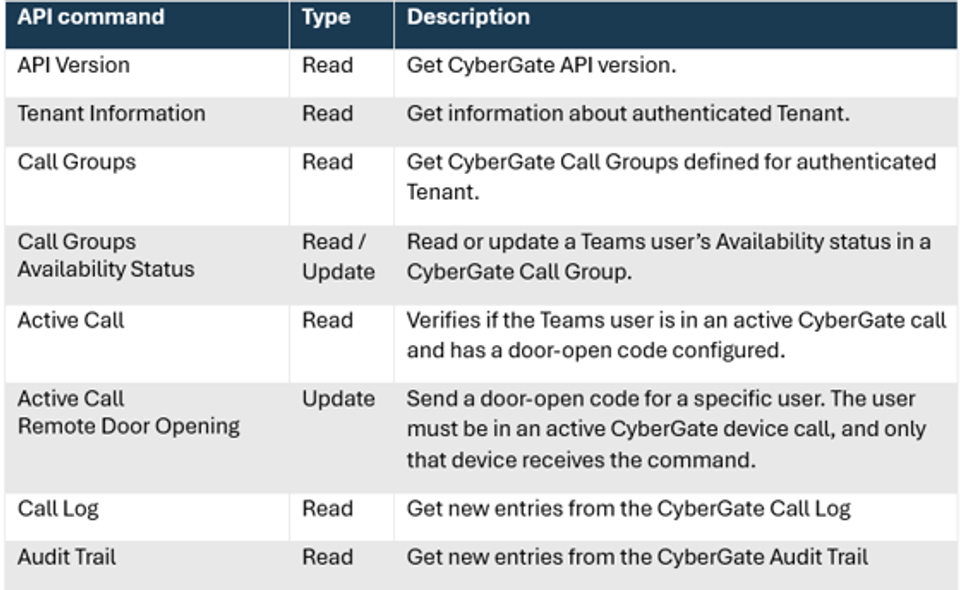
API Command
Are you looking for a single unified platform that delivers continuous ISO/SOC- compliant physical access control reporting, showing who entered which premise, when, and who in your organisation granted access ? Want to build apps that give full visibility into CyberGate Call Group membership and dynamically control Teams users’ availability to take incoming Intercom calls? Need audio and video recordings from your IP Video Intercoms to document who requested access and support your physical access control reporting ? Do you need verifiable evidence showing who initiated a Paging message when, and what the exact audio announcement contained ?
We’re excited to announce the launch of our new CyberGate API! A major step forward in unifying physical security, communications, and compliance reporting across your organization.
CyberGate connects IP Video Intercoms, IP paging systems, and SIP-enabled IP CCTV Cameras to Microsoft Teams: a single, unified platform with:
One User Interface One Audit trail format One Call Log format One API for continuous reporting supported for devices from 28 different equipment manufacturers.
Enabled by the new CyberGate API, this unified approach removes the complexity of vendor specific reporting tools - where every system uses different formats, provisioning workflows, and reporting standards
API - Main functions The CyberGate API lets you programmatically retrieve Call Log and Audit Trail events from your CyberGate environment. Feed them into your SIEM, build custom dashboards, detect access control anomalies in near-real time, or automate compliance reporting..
Use of the CyberGate API is free of charge, at least until 1 April 2027. After that, the API may become a low‑cost paid option based on Azure compute costs, capped at USD 50 - 100 per Tenant per Year.
Getting Started
The CyberGate API is disabled by default. Request activation in less than 1 minute:
Log in to the CyberGate Management Portal (CMP) Navigate to Administration → API Access Select Contact Support and Request activation We’ll enable the CyberGate API on your Tenant ID. Once enabled, generate the API key directly in the CMP.
Use the CyberGate API to build custom dashboards that provide a near real-time event log of all Intercom calls, including date, time, call duration, call status (answered, missed, cancelled), which Teams user answered the Intercom call, and whether access was granted to the visitor.
Or build applications to dynamically set or unset Availability for your Teams users, ensuring that only the right people are enabled to receive Intercom calls at the right time.
Questions or Feedback ?
We’d love to hear how you plan to use the new CyberGate API. Share your use cases with us, or let us know which additional functions you’d like to see supported next.
We’re actively shaping the CyberGate API roadmap based on your feedback ! Visit our contact page or reach out to your CyberTwice account manager.
Something is changing at CyberTwice, and today on 22 June 2026 you will see it everywhere. New website, new logos, a sharper identity that better matches the work we do every day. The name stays. CyberTwice is still CyberTwice.
CyberGate now streams ZEPCAM Body-Worn Camera video straight into Microsoft Teams, giving your frontline workforce a live, two-way line to back-office support.
Teams Phone migrations get scoped as a phone-number problem. The peripheral devices nobody scoped — door intercoms, paging, lift phones — are the gas line that breaks the project.